Leads CRM
A lightweight, drag-and-drop CRM purpose-built for engagement-driven sales — every lead carries its full conversation history.
- •At least one chatbot flow capturing email or phone
- •Optional: external CRM webhook for two-way sync
- Leads pipeline visible as a Kanban board
- First lead moved through stages
Step-by-step walkthrough
Numbered, real-world instructions you can follow today.
Sidebar → Leads. Default view is the Kanban board: New → Contacted → Qualified → Proposal → Won/Lost.
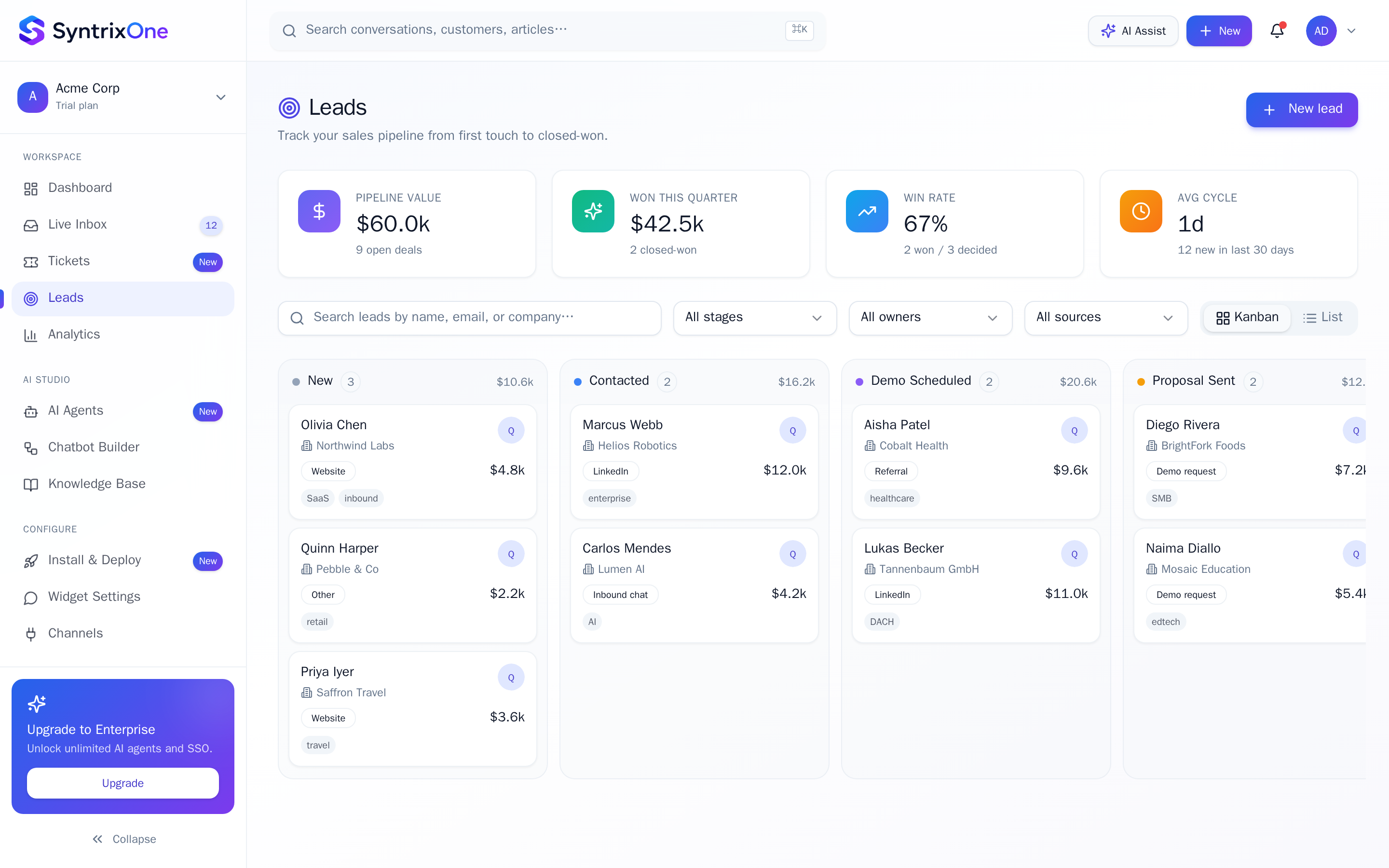
Click + Add or Import CSV. Captured leads from chatbots arrive here automatically.
Drag cards across columns. Stage changes log to the activity timeline.
Click any card. You'll see profile, notes, tasks, conversations, and email history side by side.
Tips & best practices
Field-tested advice from teams shipping SyntrixOne in production.
- Set a Stage SLA so leads cannot rot in any column for more than X days.
- Tag leads with source ("widget", "instagram-ad") for clean attribution.
Common issues & troubleshooting
What goes wrong, and exactly how to fix it.
Frequently asked questions
5 answers to the questions teams ask most.
Open the Leads pipeline
Estimated setup time: 5 minutes.
Related articles
Keep going — explore the next pieces of SyntrixOne.