Live Inbox
A unified, omnichannel inbox where humans and AI work side by side — assign, reply, and resolve from one screen.
- •At least one connected channel (widget, email, WhatsApp, Instagram, Slack, or SMS)
- •Optional: SLAs configured in Settings → SLA
- A working triage view with status, assignee, and priority
- First conversation replied to and resolved
- Macros, notes, and tags set up for your team
Step-by-step walkthrough
Numbered, real-world instructions you can follow today.
Click Live Inbox in the sidebar. The default view is Open + Assigned to me. Use the left filter rail to switch to All, Unassigned, Mentions, or any custom saved view.
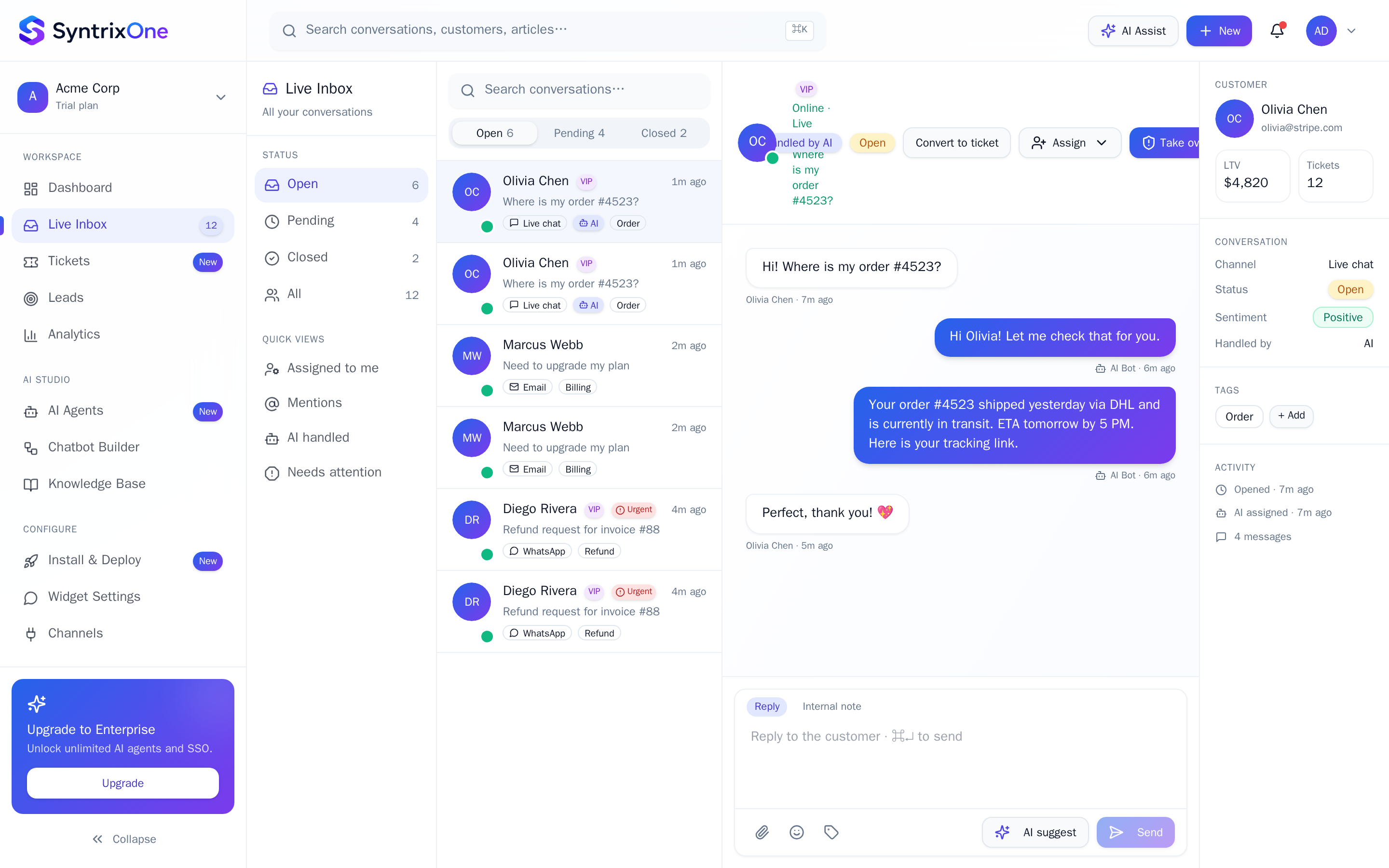
Click any row to open the conversation detail. You see the full timeline (AI + human messages), customer profile on the right, and reply composer at the bottom.
Type a reply, or pick a macro from the / menu. Macros pre-fill text with variables ({{first_name}}, {{order_id}}). Send with ⌘+Enter.
Use the right panel to assign to a teammate, set priority, add tags, or convert the conversation into a ticket for SLA tracking.
Click Resolve when done. The conversation moves to Closed; CSAT is requested from the customer automatically.
Tips & best practices
Field-tested advice from teams shipping SyntrixOne in production.
- Use saved views ("VIP", "Refunds", "Out of hours") so the team always opens on the right list.
- Internal notes (toggle to Internal in the composer) are great for handoff context and never visible to the customer.
- ⌘K opens the global command palette from anywhere in the inbox — jump to any conversation by ID, customer, or tag.
Common issues & troubleshooting
What goes wrong, and exactly how to fix it.
Frequently asked questions
7 answers to the questions teams ask most.
Open Live Inbox
Estimated setup time: 5 minutes.
Related articles
Keep going — explore the next pieces of SyntrixOne.